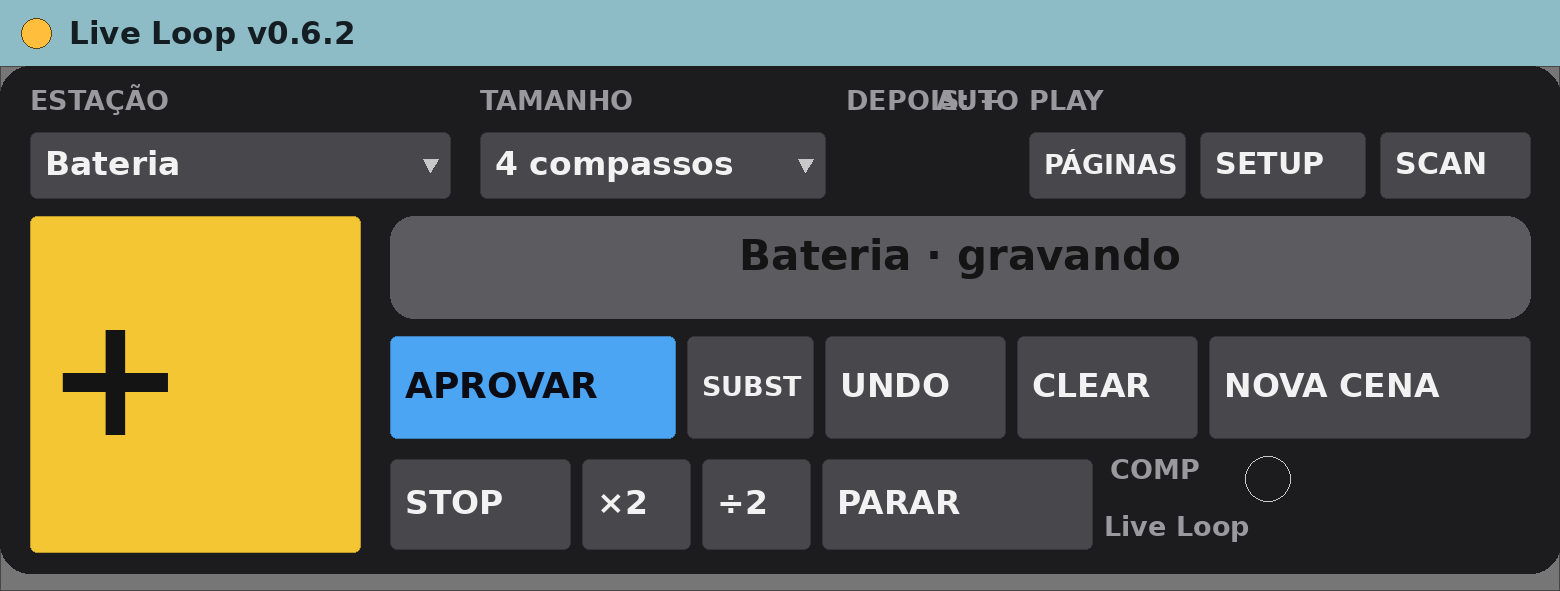
Live Loop v0.6.2
MIDI effect for Ableton Live 12 (Max for Live)
Live looping by station — drums, bass, keys, guitar, voice — driven from a pedal or a phone, recording straight into Session clips.
Free, provided as is. Built for one working live rig and shared in case it is useful to you.
What it does
- One station per instrument, each with its own track and colour.
- Record, overdub, approve and replace loops without touching the computer.
- Approved loops become clips in a new Session scene.
- Quantise on approval, globally or per station.
- A web page gives each musician the buttons for their own station.
The device panel
- SCAN finds or creates the station tracks.
- SETUP chooses the stations.
- PÁGINAS opens the phone page.
- APROVAR, SUBST, UNDO, CLEAR, NOVA CENA, STOP and the loop length controls.
Requirements
- Ableton Live 12 Suite (Max for Live included)
- Max 9.2 or newer
- macOS (built and tested on Apple Silicon)
- Live 12 Suite, Max 9.2
- A MIDI pedal or a phone on the same Wi-Fi (optional)
Install
- Unzip.
- Copy
Live Loop v0.6.2.amxdinto your Ableton User Library (for exampleUser Library/max dani/). - In Live’s browser, find it under User Library and drag it onto a track.
Setting it up
- Drop it on a MIDI track and press SCAN.
- Use SETUP to pick the stations and PÁGINAS for the phone page.
Known limits
- Beta, and the least tested of the set.
- Interface in Portuguese.
- The Live API cannot create groups, so station tracks come out loose and coloured.
- Its data files are written next to the device.
Version
- v0.6.2 — current release.
Support
No support promised, but bug reports are welcome. Say what you did, what you expected and what happened, with your Live and Max versions.