Live Cue v0.1.2
MIDI effect for Ableton Live 12 (Max for Live)
Cubase-style headphone cue mixes inside Ableton. Each musician opens a page on their phone and controls their own monitor mix.
Free, provided as is. Built for one working live rig and shared in case it is useful to you.
What it does
- Every return track carrying the Cue Out device becomes one musician’s mix, named after the return.
- The musician picks their name and gets one fader per channel, the level meter inside the fader and the dB beside it.
- MUTE per channel applies to that mix only, and remembers the level for when it comes back.
- A yellow My mix row is their own headphone volume.
- Only groups and tracks outside a group are offered, so a drum group travels on one fader.
- The panel on the Mac picks which channels they see, shows every mix and who is connected, draws a Wi-Fi QR code and prints a sheet for the wall.
The device panel
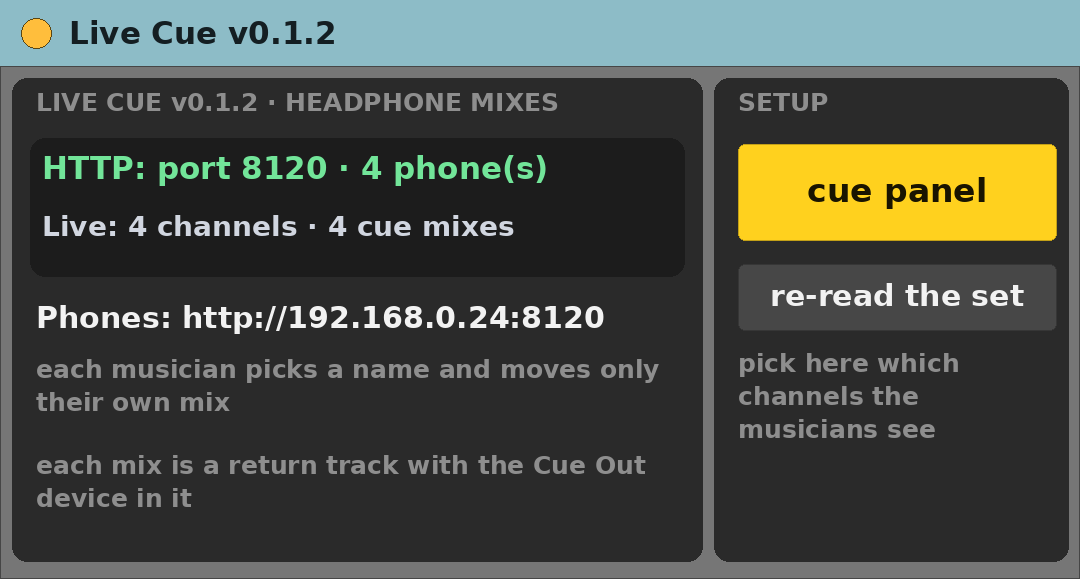
- cue panel — opens the panel in the Mac’s browser.
- re-read the set — after adding tracks or returns.
- Two status lines: the server and the Live API.
Requirements
- Ableton Live 12 Suite (Max for Live included)
- Max 9.2 or newer
- macOS (built and tested on Apple Silicon)
- All phones on the same Wi-Fi
- Ports 8120 and 8122 free
- One Cue Out device per headphone return
Install
- Unzip.
- Copy
Live Cue v0.1.2.amxdinto your Ableton User Library (for exampleUser Library/max dani/). - In Live’s browser, find it under User Library and drag it onto a track.
Setting it up
- Create one return track per musician, named after them.
- Drop Cue Out into each of those returns.
- Switch those returns to Pre — Live does not expose that button to Max.
- Pick the interface output in Audio To.
- Drop Live Cue on any MIDI track, click cue panel, tick the channels, let them scan the QR code.
Known limits
- Never use a group’s on/off switch during a show: in Live that kills the sends too and every headphone drops at once. Use the page’s MUTE.
- The returns must be set to Pre by hand.
- The title bar still reads v0.1.0 — cosmetic.
- Only tested on the author’s rig.
Version
- v0.1.2 — current release.
Support
No support promised, but bug reports are welcome. Say what you did, what you expected and what happened, with your Live and Max versions.