Live Remote BGM v1.2
MIDI effect for Ableton Live 12 (Max for Live)
Picks a background track at random from a Drum Rack and plays it between songs, controlled from the iPad.
Free, provided as is. Built for one working live rig and shared in case it is useful to you.
What it does
- Each pad of the Drum Rack holds one background track.
- Plays one at random, with a clean cut to stop.
- Start and stop from the device or from Live Remote.
The device panel
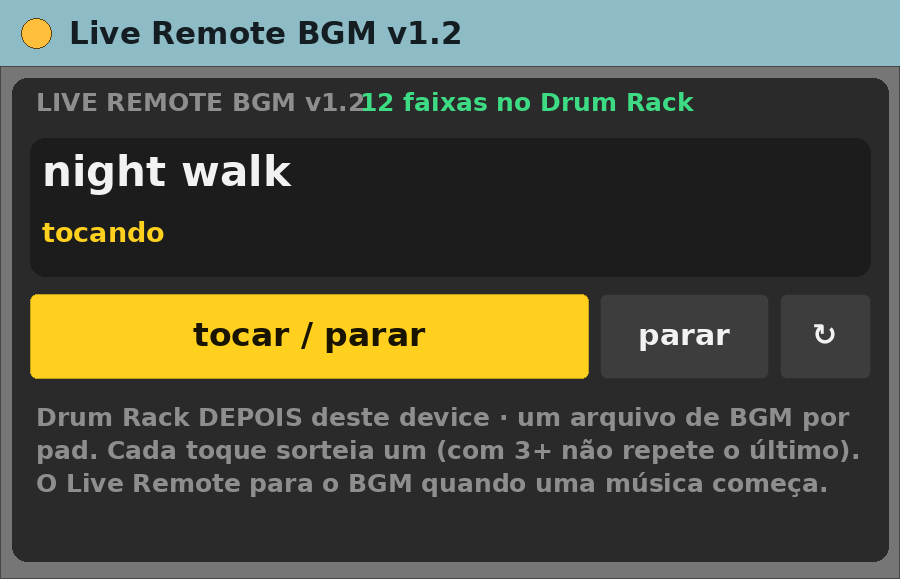
- tocar / parar and parar buttons, a refresh arrow, and the name of what is playing.
Requirements
- Ableton Live 12 Suite (Max for Live included)
- Max 9.2 or newer
- macOS (built and tested on Apple Silicon)
- A Drum Rack placed AFTER this device on the same track, with one audio file per pad
Install
- Unzip.
- Copy
Live Remote BGM v1.2.fixed.amxdinto your Ableton User Library (for exampleUser Library/max dani/). - In Live’s browser, find it under User Library and drag it onto a track.
Setting it up
- Drop it on a MIDI track, then put the Drum Rack after it.
- Press tocar / parar.
Known limits
- Interface in Portuguese.
- Reads the Drum Rack that comes right after it.
Version
- v1.2 — current release.
Support
No support promised, but bug reports are welcome. Say what you did, what you expected and what happened, with your Live and Max versions.