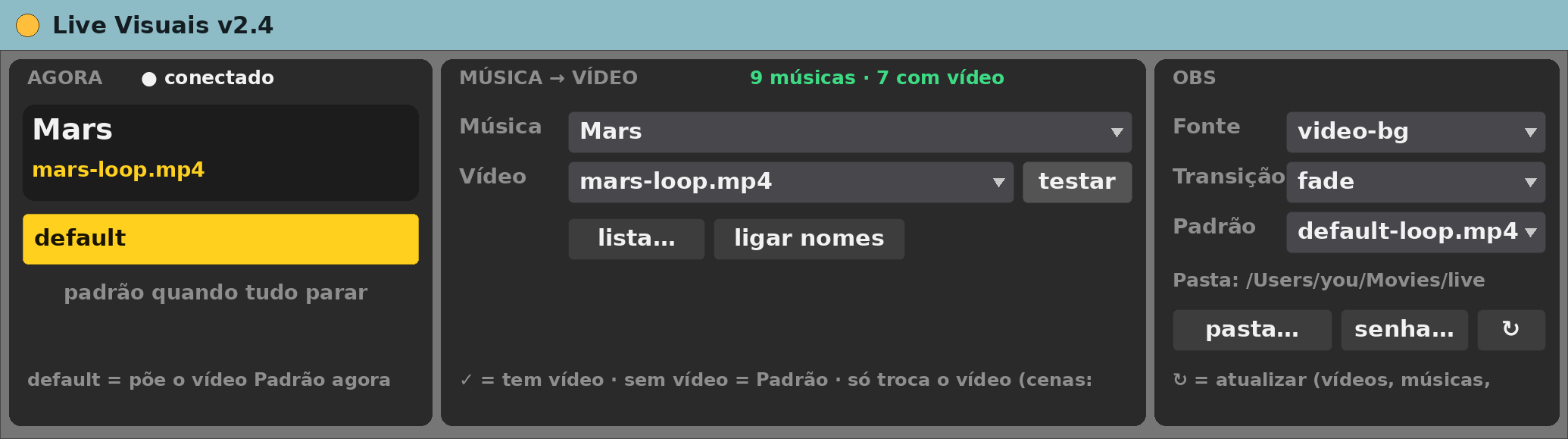
Live Visuais v2.4
MIDI effect for Ableton Live 12 (Max for Live)
A different video loop in OBS for every song, switched by the scene you fire in Ableton.
Free, provided as is. Built for one working live rig and shared in case it is useful to you.
What it does
- Talks to OBS over the OBS WebSocket straight from Max. No Node.
- Point it at a folder of videos; each song whose name matches a file gets that video.
- Songs with no video fall back to a default clip.
- Cut or fade between them.
- Lists which songs have a video (✓) and which fall back.
The device panel
- senha… — the OBS password.
- pasta… — the video folder.
- Source, transition, song, video and default menus.
- testar plays the chosen video now.
Requirements
- Ableton Live 12 Suite (Max for Live included)
- Max 9.2 or newer
- macOS (built and tested on Apple Silicon)
- OBS 28 or newer with OBS WebSocket 5 enabled
- A folder of video files reachable by OBS
- A media source in OBS to drive
Install
- Unzip.
- Copy
Live Visuais v2.4.amxdinto your Ableton User Library (for exampleUser Library/max dani/). - In Live’s browser, find it under User Library and drag it onto a track.
Setting it up
- Drop it on any MIDI track.
- senha… for the OBS password, pasta… for the folder.
- Choose the OBS source and the default clip.
Known limits
- Interface in Portuguese.
- Matching is by song name, so names must match the file names.
- Only tested on the author’s rig.
Version
- v2.4 — current release.
Support
No support promised, but bug reports are welcome. Say what you did, what you expected and what happened, with your Live and Max versions.