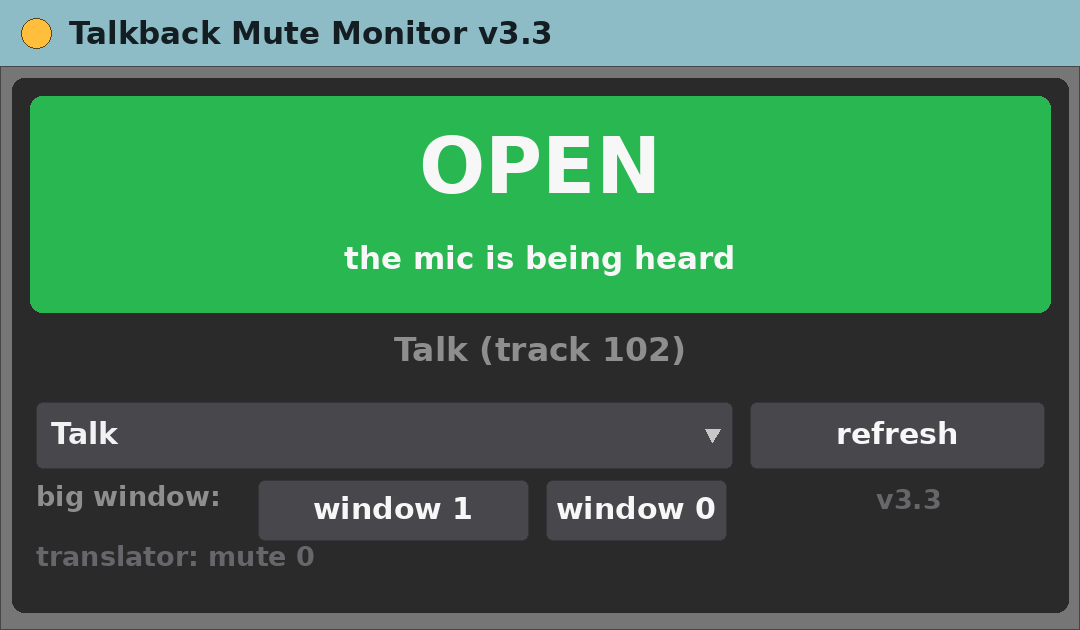
Talkback Mute Monitor v3.3
MIDI effect for Ableton Live 12 (Max for Live)
One glance tells you whether the talkback mic is actually being heard — including the two cases a mute indicator normally misses.
Free, provided as is. Built for one working live rig and shared in case it is useful to you.
What it does
- Pick the talkback track by name; a big coloured block shows OPEN, MUTED, MUTED BY SOLO or MUTED BY GROUP.
- Solo on any other track silences your mic while the track’s own mute still reads 0. This catches it.
- A muted group containing the track does the same, and is caught too.
- big window: a floating window you resize with the mouse; the text follows the size.
- Sends the state over UDP to 127.0.0.1:9077 as
mute 0/mute 1, for subtitle or streaming software to follow. - Publishes the same state inside Max as
tbm_state, which OBS Scenes 2.9 can follow.
The device panel
- The coloured block with the state, the track name and the reason.
- A menu to pick the track, and refresh.
- window 1 and window 0 open and close the big window.
- A line showing what was last sent over UDP.
Requirements
- Ableton Live 12 Suite (Max for Live included)
- Max 9.2 or newer
- macOS (built and tested on Apple Silicon)
- Nothing beyond Live and Max. The UDP message is ignored if nobody is listening.
Install
- Unzip.
- Copy
Talkback Mute Monitor v3.3.amxdinto your Ableton User Library (for exampleUser Library/max dani/). - In Live’s browser, find it under User Library and drag it onto a track.
Setting it up
- Drop it on any MIDI track and pick the talkback track in the menu. The choice is saved with the Live Set.
- To turn the UDP message off, send the device the message
translator 0.
Known limits
- It only reads; it never changes the mute.
- Two tracks with the same name make it stop and say so, rather than guess.
Version
- v3.3 — current release.
Support
No support promised, but bug reports are welcome. Say what you did, what you expected and what happened, with your Live and Max versions.